Python String
难度: 1
时长: 30 min
在学习本小节之前,你最好先学习 List and Tuple Tutorial 1 中的基本内容,了解 List 的基本用法。
Python 字符串表示方法
Python 如何表示字符串?
单引号定界
'abc'双引号定界
"abc"3引号定界
'''abc''',"""abc"""为什么要提供单引号和双引号重复的功能?
I'm fine, doesn't如何表示字符串
"Isn't," they said.? 试着将他打印出来
小心路径中的反斜杠(\\)
用 Python 程序打开电脑上指定路径
C:\some\name\test.txt的文件,并读取其内容用 Python print 打印这条字符串,会发现什么问题?
运行下面的代码,遇到了什么问题? 怎么解决?
path = "实际文件路径"         # 如 C:\some\name\test.txt
with open(path) as fl:
    txt = fl.read()
    print(txt)

# Tip:
# print('C:\some\name\test.txt')
怎么表示多行字符串?
打印下面的多行字符串,并保持格式:
Usage: paradio [hello]
    -h help
    -H docs
在文件 multiline_comments.py 中编写你的代码,然后在终端用 pyhton multiline_comments.py 运行
s="""\
Usage: paradio [hello]
    -h help
    -H docs
"""
print(s)
Python 字符串基本操作
字符串 连接 有哪些方法?
如何 拆分 字符串(一般是按句子、段落、或空格拆分)?
如何 取得 字符串中的部分字符?
怎样 修改 字符串中的部分字符?
Python 会有 下标越界 问题吗?
字符串连接
字符串字面值相邻连接;
>>> "Hello" 'world' """!"""
>>> a="hello"
>>> b="world"
>>> a b #???
+号连接>>> "Hello" + 'world' + """!""" >>> a="hello" >>> b="world" >>> a + b
注意:
+操作符一般都比字符串字面值邻接更好用 (例外);字符串除了可以使用
+操作符之外,也可以像 List 一样使用*, 即str * n或n * str
str.join()
>>> " ".join([a,b])
>>> "".join([a,b])
>>> " ".join(a,b)   #???
有什么发现值得注意?
练习: 如果 a = ['Hello', 'World', '!'],如何利用字符串的方法 join() 将其两个成员连接在一起呢?分别得到:
中间不带空格的
'helloworld!',中间带空格的:
'hello world !',中间用下划线的
'hello_world_!'
字符串分隔 str.split()
练习
取
'hello world'中的第1个单词,或最后一个单词;取文件名
'my_code.py'的扩展名;取路径
'/home/Tom/note.txt'中的文件名;或取文件的父目录;取 url
'http://www.scuec.edu.cn/index.html'中的域名
取一个、多个、全部成员
从 String 中取个别或多个成员的操作和 List / Tuple 采用相似的方法。例如:
如何取得字符串中的1个字符?
例: 从
"foobar"中取得"f"。 该方法适用于所有序列数据类型如何取得字符串中的连续多个字符?
例:从
"foobar"中取得"foo"。 该方法适用于所有序列数据类型怎样修改字符串中的部分字符?
'foobar'-->'Foobar',怎么做?Python字符串做为一个整体不允许修改。Python 会有下标越界问题吗? 即,如果:
s = "foobar"(1)
s[42]会怎样? (2)s[4:42]会怎样?
字符串常用方法
center(n)find(), see also:index(),count(),injoin(),split()lower(),upper(),capitalize(),replace()strip()isspace()、isdigit()和isupper()
字符串输出格式化
下面的一组方法均是将 值 "world", "hot" 代入模板: "Hello, (). () enough for ya?",得到 "Hello, world. hot enough for ya?" 。它们都可一次代入多个成员,比较方便。
% 方法
最传统的方法
>>> template = "Hello, %s. %s enough for ya?"
>>> values = ('world', 'Hot')
>>> template % values
'Hello, world. Hot enough for ya?
str.format()
功能强大,用起来也不复杂
>>> 1 顺序填入
>>> template = "Hello, {}. {}enough for ya?"
>>> values = ('world', 'Hot')
>>> template.format(*values)     # 参见星号的用法: 序列解包

>>> 2 编号参数
>>> template="Hello, {1}. {0}enough for ya?"
>>> values = ('Hot', 'world')
>>> template.format(*values)

>>> 3
>>> "{3} {0} {2} {1} {3} {0}".format("be", "not", "or", "to")
#=  'to be or not to be'

>>> 4 使用关键字命名参数
>>> "Hello, {name}!".format(name="world")
注意 *values 中有一个星号,其它用是序列解包,把一个列表变量解包成函数的多个参数。详见: Args-And-Kwargs
请问数字起了什么作用? 能用变量名来代替数字吗?
更多的用法见: String Format 举例
f 表示法
最简洁轻便的用法
要求: python3.6+
>>> who = "Mars"
>>> what = "Dusty"
>>> out = f"Hello, {who}! {what} enough for ya?"
string.Template()
Template() 实现了更好用的变量名替换:
>>> from string import Template
>>> tmpl = Template("Hello, $who! $what enough for ya?")
>>> tmpl.substitute(who="Mars", what="Dusty")
String Formatting Trick 部分更详细地说明了不同方法的优缺点及最推荐的方法。
综合练习: 空格格式化
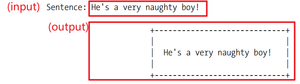
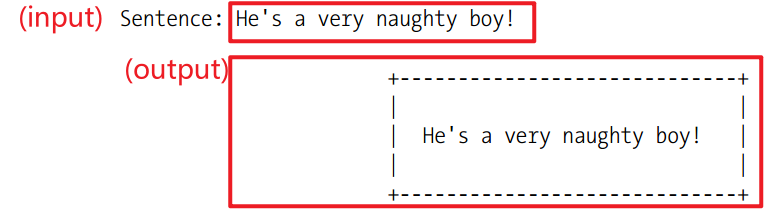
已知输入和输出文本,编写所需要的格式化代码。注意: 输出要适应输入的长度变化。
写代码前先说一说,哪些地方会需要用到刚才的哪些序列操作?
提高题:
如果你的输入包含中英文混合字符,你的代码还能有效工作吗? 难度+1
和前面的文本加框类似,本练习的输入文本为多行字符串,请编写代码完成加框格式化。格式化选项:
左对齐
居中对齐
右对齐
高级操作
下面的模块(包)能让你完成更高级、更复杂的字符串操作,都非常常用。
Re 正则表达式
从半结构化文本中查找(匹配),修改 (替换)
用正则表达式从消息 s="DAI24443527: Hello!" 中提取 QQ号, 姓名,和消息,并把它们分开
>>> import re
>>> r=re.search(r'(\w+)(\d+): (\w+)',s)
>>> r.group(1)
>>> r.group(2)
>>> r.group(3)
Beautifulesoup
专业用于从 xml, html, json 等结构化数据中解析数据。
Jinja2
用于复杂文本(文档)格式化